Accounts Payable: Managing Utility Payments Made Simple
3/18/20262 min read
If you own rental properties, you already know utilities can quickly take over your life — water, gas, electric, internet, trash, sewer, landscaping, and more. Some bills are on auto-pay, others come through EFT, a few still arrive as PDFs, and multiple accounts across multiple properties make it feel like a never-ending chase.
Most property owners tell me the same thing: “I don’t even know where to start. I’m drowning in bills.”
You do not need complicated accounting tools or advanced software to regain control. You need visibility, organization, and a system that works every single month — without stress.
The Problem I want to Solve: Too Many Bills, Not Enough Structure
Here’s what typically causes chaos: • Bills split across auto-pay, EFT, manual pay • No centralized list of vendors or accounts • No way to track invoices vs. payments • Too many bill formats • Unclear what has been paid and what must be recorded in software
This leads to: • Missed payments • Late fees • Double payments • Incorrect books • Overbooking or under booking of operating expenses
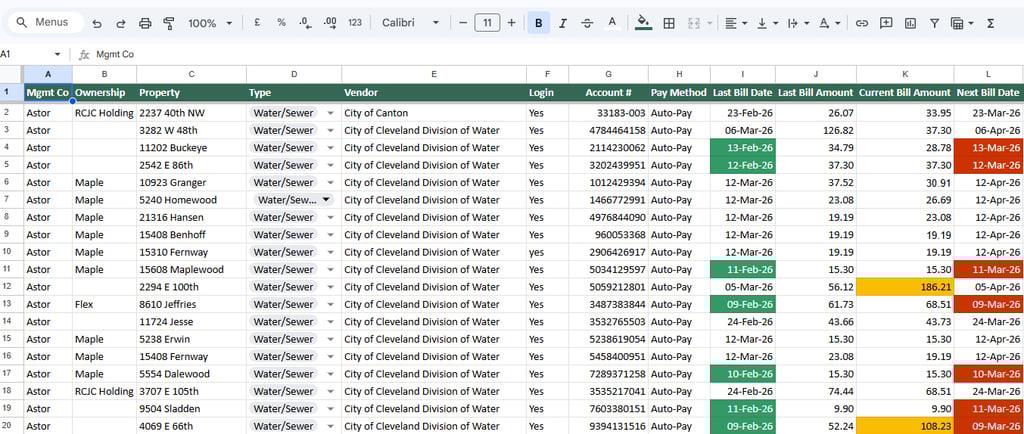
The Simple Solution: A Visual, Conditionally-Formatted, Accounts Payable (AP) Schedule
A visual AP Schedule — a spreadsheet that is simple, color-coded, and powerful.
It shows at a glance: ✔ Every utility and recurring payment ✔ Every property and vendor ✔ Due dates ✔ Payment status ✔ Whether invoices have been saved ✔ Whether items have been recorded in Buildium or AppFolio
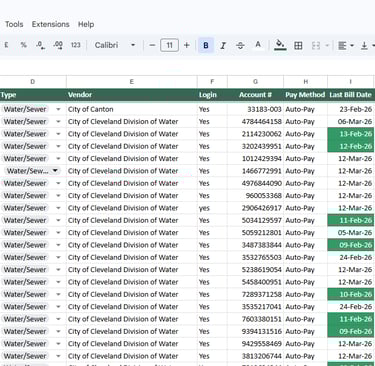
Correct conditional formatting rule used: Any bill that is due today OR where the last bill pulled is older than 30 days lights up red and green.
How the Visual System Works
1. Vendor Information List sewer, water, electric, gas, trash, subscriptions, insurance, taxes, mortgage payments.
2. Bill Tracking Track invoice received, due date, amount, billing period, download status.
3. Payment Tracking Mark whether paid, method used, and whether it has been recorded in accounting software.
4. Alerts Red & Green appear when bills are due today OR older than 30 days. Nothing slips through the cracks.
5. Filtered Views
Extensive filtering is also available to view data property-wise, vendor-wise, due-date wise or bill-date wise
6. Track non-utility payments as well
This sheet has dedicated tabs for your mortgages, your property tax, your insurance payments, and office subscriptions
7. Tenant Chargebacks
We also create a dedicated tab to track tenant pass-throughs and chargebacks.
Why This Works Better Than Automation Alone
Automation helps, but visibility is essential.
Owners relying on autopay and email folders still feel overwhelmed because: • They can’t see everything in one place • They don’t remember which bills are auto-paid • They don’t track invoice saving & recording • Missing invoices create missing expenses
The AP Schedule becomes the single source of truth.
How This Helps With Bookkeeping (Buildium/Appfolio/Rent Manager/Yardi Breeze/QBO Online)
Because all bills are organized:
• Buildium entries become accurate • Reconciliations are simple • Reports are clean • Tax prep is painless • No vendor or invoice is overlooked
Want This Setup Done For You?
I offer:
✔ AP Schedule setup and management ✔ Utility + recurring payment tracking ✔ Bill downloads and back up to drive ✔ Buildium / AppFolio bill entry & reconciliation ✔ A complete audit trail for tax season
✔ A complete audit trail for tax season
If keeping track of bills is eating into your time or causing stress, this system will transform your operations
Contact
Find us on LinkedIn and Facebook
Phone
contact@brookesideaccounting.services
+1 857-208-7210
© 2025. All rights reserved.
QUERIES