Payroll for Rental Property Owners: A complete Guide
Learn how to run payroll for rental property staff, allocate costs property-wise, and stay compliant with US payroll tax requirements.
PAYROLL
Aditya Kumar
3/18/20266 min read
Payroll for Rental Property Owners: A Complete Guide
Learn how to run payroll for rental property staff, allocate costs property-wise, and stay compliant with US payroll tax requirements.
Why Payroll for Rental Properties Is More Complex Than You Think
Most rental property owners understand rent collection, maintenance costs, and mortgage payments. But when it comes to payroll, many underestimate just how much is involved — and how costly mistakes can be.
Payroll for rental property operations is not simply issuing checks every two weeks. It requires precise gross pay calculations, correct federal and state tax withholding, proper liability tracking, accurate journal entries into your accounting system, and property-wise cost allocation across your portfolio.
Get any one of these wrong and you are looking at IRS penalties, incorrect financial statements, and a bookkeeping cleanup that costs far more than getting it right the first time.
This guide walks through everything a US rental property owner needs to know about running payroll correctly — from calculation formulas to journal entries, GL coding, and software platforms.
Who Needs Payroll Services as a Rental Property Owner?
Not every rental property owner runs payroll — but more do than you might expect. You likely need a payroll system in place if you employ any of the following:
Property managers on your direct payroll
Maintenance staff or handymen employed as W-2 workers
Leasing agents working for your management company
Administrative staff handling tenant communications or bookkeeping
1099 independent contractors — plumbers, electricians, landscapers — who need annual 1099-NEC filings
The distinction between W-2 employees and 1099 contractors matters enormously for tax purposes. Misclassifying an employee as a contractor is one of the most common — and expensive — payroll mistakes in the rental property industry. The IRS takes misclassification seriously, and penalties can be substantial.
The Core Payroll Calculation Formulas
Before any payroll can be processed, the numbers need to be right. Here are the fundamental formulas we use at Brookeside Accounting for every payroll run:
1. Gross Pay
Gross Pay = (Total Hours Worked × Hourly Rate) + PTO + Bonuses + Commissions + Incentives
This is the starting point. Every element — including paid time off and any bonuses — must be captured before deductions begin.
2. Net Pay / Check Amount
Net Pay = Gross Pay − Employee Taxes
or equivalently:
Check Amount = Net Pay = Gross Pay − Employee Tax
This is what the employee actually receives — their take-home pay after all employee-side tax deductions. Employee taxes include federal income tax withholding, Social Security (6.2%), and Medicare (1.45%). State income tax withholding applies depending on the state where your employees work.
3. Total Tax Impound
Total Tax Impound = Employee Taxes + Employer Taxes
This is the total tax liability for the payroll period — both what the employee contributes and what you as the employer owe on top. Employer-side taxes include the matching Social Security and Medicare contributions, plus federal and state unemployment taxes (FUTA and SUTA).
4. Total Payroll Cost
Total Payroll Cost = Net Pay + Employee Tax + Employer Tax
or equivalently:
Total Payroll Cost = Gross Pay + Employer Tax
or:
Total Payroll Cost = Net Pay + Total Tax Impound
This is the true cost of employment to the property owner — not just what the employee takes home, but the full cash outflow including all tax obligations on both sides. Many rental property owners budget based on gross pay alone and are caught off guard by the employer tax burden on top.
5. 401(k) Employee Contribution
Employee Check Amount = Net Pay − Employee 401(k) Contribution
If your employees contribute to a 401(k) plan, this deduction comes out of net pay. The employer match is funded separately and does not affect the employee's check amount.
6. Cash Reimbursements Cash reimbursements for expenses incurred by employees — mileage, supplies, tools — are recorded separately and do not flow through net pay calculations. They are not taxable compensation and must be tracked distinctly to keep your books clean.
Payroll Journal Entries for Rental Property Accounting
Accurate journal entries are what connect your payroll runs to your accounting system — whether that is Buildium, AppFolio, QuickBooks Online, or Xero. Here is how the entries work:
Entry 1 — Payroll Accrual (on Payroll Date)
DR Payroll Expense CR Payroll Liabilities
This entry records the expense and the liability simultaneously on the date payroll is processed, before any cash has moved.
Entry 2 — Cash Payment to Employees
DR Payroll Liabilities CR Cash
When employee checks or direct deposits are issued, this entry clears the liability and reduces your cash balance.
Entry 3 — Tax Payment to Authorities
DR Payroll Liabilities CR Cash
When federal and state tax payments are remitted, this entry clears the remaining tax liabilities from your books.
The Clearing Account Test
The Payroll Liabilities account functions as a clearing account. When you run an All Dates report on this account, the balance should always be zero once all employee payments and tax remittances have been made. If it is not zero, something has been missed — a payment, an entry, or a reconciliation.
This is one of the first things we check when onboarding a new rental property client whose payroll has been managed internally.
GL Coding for Payroll Expenses
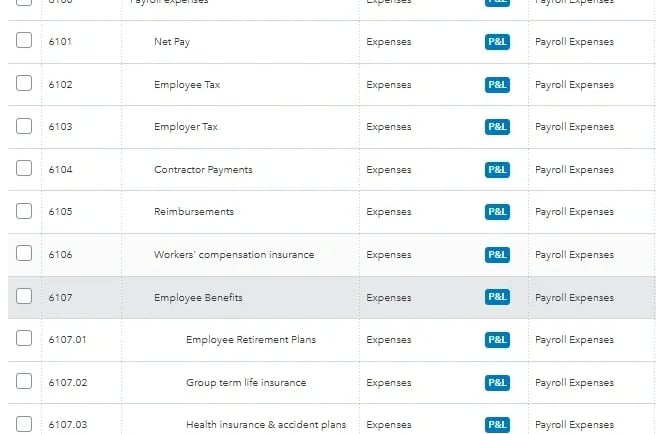
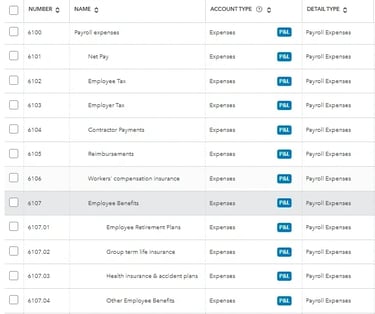
Proper General Ledger coding ensures that every dollar of payroll expense is categorised correctly on your Income Statement. At Brookeside Accounting, we assign payroll to distinct GL codes for complete transparency and reporting accuracy:
Net Pay (6101) — the actual take-home amount paid to employees
Employee Payroll Taxes (6102) — the employee's share of Social Security and Medicare
Employer Payroll Taxes (6103) — your matching contributions as the employer
Contractor Payments (6104) — payments to 1099 independent contractors
Cash Reimbursements (6105) — non-taxable expense reimbursements
Workers' Compensation Insurance (6106) — premiums paid for workers' comp coverage
Employee Benefits (6107) — health insurance, retirement contributions, and other benefit costs
Employee Retirement Plans (6107.01) — 401(k) employer match and related contributions
Group Term Life Insurance (6107.02) — employer-paid life insurance premiums
This level of GL granularity gives you a complete picture of your true labour costs — not just what employees take home, but everything it costs you to employ them.
Property-Wise Payroll Allocation
This is where payroll accounting for rental properties differs fundamentally from payroll for a typical small business.
If you own multiple properties and your maintenance staff or property managers split their time across them, payroll costs need to be allocated property by property — not lumped into a single expense line. This matters for:
Accurate property-level P&L statements — you need to know the true profitability of each property
Investor reporting — partners and investors want to see costs allocated to the properties they have an interest in
Tax purposes — deductions must be allocated to the correct property or entity
At Brookeside Accounting, we track employee costs by property, project, or class depending on your portfolio structure and reporting requirements. Every payroll run includes a property-wise allocation that feeds directly into your accounting software.
Payroll Software We Work With
Having used a wide range of payroll platforms, we have a clear sense of what works best for rental property operations. Here is our experience across the major platforms:
Gusto — Our personal favourite for rental property payroll. Clean interface, excellent tax filing automation, strong contractor payment handling, and seamless integration with QuickBooks Online and Xero. Ideal for portfolios with a mix of W-2 staff and 1099 contractors.
Intuit Payroll / QuickBooks Payroll — Works well when your accounting is already in QuickBooks Online. The native integration eliminates manual journal entries, which reduces the risk of posting errors.
ADP — Robust enterprise-grade platform suited to larger portfolios with more complex payroll needs. More feature-rich than most small operators need, but scalable.
Deel — Particularly useful if you have remote staff or contractors in multiple states or countries. Strong compliance features for multi-jurisdiction payroll.
Regardless of which platform you use, the payroll data needs to flow accurately into your property management or accounting software. We handle that integration as part of every payroll engagement — posting the bi-weekly journal entry into Buildium, AppFolio, QuickBooks Online, or Xero on every payroll cycle.
Common Payroll Mistakes Rental Property Owners Make
Based on our experience onboarding new clients, here are the most frequent payroll errors we encounter — and fix:
1. Misclassifying W-2 employees as 1099 contractors The IRS has specific criteria for contractor classification. If a worker is under your direct control and works set hours, they are almost certainly a W-2 employee. Misclassification can trigger back taxes, penalties, and interest going back years.
2. Not tracking payroll by property Lumping all payroll into a single expense account makes property-level reporting impossible. You cannot manage what you cannot measure.
3. Forgetting employer-side taxes Many owners budget only for the employee's gross pay and forget that employer taxes add approximately 7.65% on top — plus FUTA, SUTA, and workers' compensation premiums.
4. Missing payroll tax deposit deadlines The IRS has strict deadlines for payroll tax deposits. Missing them triggers automatic penalties starting at 2% and escalating to 15% for deposits more than 10 days late.
5. Not reconciling the Payroll Liabilities account If this account carries a balance after all payments have been made, your books are wrong. This is one of the most common — and most overlooked — payroll bookkeeping errors.
How Brookeside Accounting Handles Payroll
Our bi-weekly payroll service for rental property owners is designed to be accurate, transparent, and fully compliant with US federal and state requirements. Here is what we do on every payroll cycle:
Calculate gross pay, net pay, and total tax impound for all W-2 employees
Process contractor payments and track 1099 liability throughout the year
Post the payroll journal entry into your accounting software within 24 hours of payroll processing
Allocate payroll costs to the correct property, project, or class
Reconcile the Payroll Liabilities clearing account after every run
File quarterly payroll tax returns (941, state equivalents) and annual W-2 and 1099-NEC filings
With Brookeside Accounting handling your payroll, it becomes precise, compliant, and completely stress-free.
Ready to take payroll off your plate? Book a free consultation with Brookeside Accounting and let us build a payroll system that fits your portfolio.
Brookeside Accounting provides specialised real estate accounting services for rental property owners and managers across the United States, working remotely through Buildium, AppFolio, QuickBooks Online, and Xero.
Contact
Find us on LinkedIn and Facebook
Phone
contact@brookesideaccounting.services
+1 857-208-7210
© 2025. All rights reserved.
QUERIES