Property Manager's Guide to Accounts Payable: Utilities, Vendors & More
A complete guide to accounts payable for property maangers - covering utilities, vendor bills, mortgages, insurance, taxes and subscriptions
ACCOUNTS PAYABLEUTILITIES PAYABLE
Aditya Kumar
6/5/20267 min read
Accounts Payable for Property Managers: A Complete Guide to Managing Utilities, Vendors & Recurring Payments
A complete guide to accounts payable for property managers — covering utility bills, vendor invoices, mortgages, insurance, taxes and subscriptions.
The Bill That Never Ends
If you own rental properties, you already know utilities can quickly take over your life. Water, gas, electric, internet, trash, sewer, landscaping, and more — spread across multiple properties, multiple vendors, and multiple payment methods.
Some bills are on auto-pay. Others come through EFT. A few still arrive as PDFs in your inbox. And every single property has its own set of accounts, due dates, and vendor portals.
Most property owners tell me the same thing: "I don't even know where to start. I'm drowning in bills."
The good news is you do not need complicated accounting tools or expensive software to regain control. You need three things: visibility, organisation, and a system that works every single month without stress.
This guide explains exactly how we build that system for US rental property owners — and why it transforms operations for anyone managing more than a handful of units.
Why Rental Property AP Is More Complex Than a Standard Business
Accounts payable for a typical small business is relatively straightforward — a handful of vendors, predictable invoices, one bank account. Rental property AP is fundamentally different, and that difference is what catches most owners off guard.
Here is what makes it uniquely complex:
Multiple properties mean multiple of everything. Each property has its own utility accounts, its own vendors, its own payment schedules. A portfolio of 10 properties might have 40 to 60 active utility accounts alone.
Payment methods are inconsistent. Some utilities are on auto-pay. Some require manual EFT. Some send paper invoices. Some only accept checks. Managing all of these simultaneously without a structured system is where mistakes happen.
Bill formats vary wildly. A water bill from Cleveland Public Power looks nothing like a gas bill from Enbridge. Extracting the right information — billing period, meter reading, due date, amount — from each format takes time and attention.
Tenant chargebacks add another layer. Many utility costs are passed through to tenants, either directly or as part of their rent calculation. Tracking which bills are owner costs and which are tenant chargebacks requires a dedicated system.
Multiple software platforms create data entry risk. Whether you use Buildium, AppFolio, Rent Manager, Yardi Breeze, or QuickBooks Online, every bill needs to be recorded accurately in your accounting software — and that only happens reliably when the source data is organised.
The Root Causes of Accounts Payable Chaos
When property owners come to us overwhelmed by bills, the underlying problems almost always fall into the same categories:
No centralised vendor list. Bills are scattered across email inboxes, auto-pay confirmations, and filing folders with no single place to see all vendors and accounts at once.
No tracking of invoices vs payments. Knowing a bill was paid is not the same as knowing it was recorded correctly in your accounting software. These are two separate steps — and missing either one creates problems.
Bills split across too many payment methods. When some bills auto-pay, some require action, and some sit in a queue, it is almost impossible to know at any given moment what has been handled and what has not.
No alert system for due dates or overdue bills. Without a trigger to flag bills that are coming due or have not been updated recently, things slip through. Late fees, missed payments, and double payments follow.
No audit trail for tax season. When year-end arrives and your accountant asks for documentation, scrambling to reconstruct months of utility payments from email confirmations and bank statements is time-consuming and error-prone.
This leads to real consequences: missed payments, late fees, double payments, incorrect books, and overbooking or underbooking of operating expenses that distort your property-level P&L.
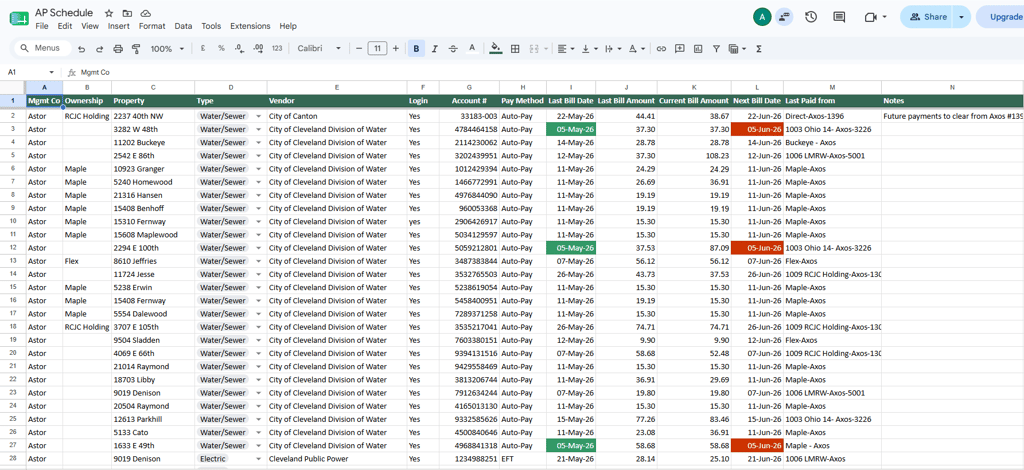
The Solution: A Visual, Conditionally-Formatted AP Schedule
The most effective solution we have found — and the one we build for every client — is a visual AP Schedule. Not a complicated tool. Not an expensive software subscription. A structured, colour-coded spreadsheet that gives you complete visibility into every bill across your entire portfolio.
Here is what it shows at a glance:
Every utility and recurring payment across all properties
Every vendor and account number in one place
Due dates and billing periods
Payment status — paid, pending, or overdue
Whether the invoice has been downloaded and saved
Whether the bill has been recorded in Buildium, AppFolio, or your chosen software
The design principle is simple: if you can see it, you can manage it.
How the AP Schedule Works: A Section-by-Section Breakdown
1. Vendor Information
The foundation of the schedule is a complete list of every vendor and utility account in your portfolio. This includes:
Sewer and water accounts
Electric and gas accounts
Trash and recycling services
Internet and cable subscriptions
Landscaping and snow removal vendors
Insurance premiums
Property tax accounts
Mortgage payments
Every account has its own row — vendor name, account number, property, payment method, and portal login reference. This is your master vendor directory, always up to date.
2. Bill Tracking
For each vendor, the schedule tracks the current invoice: date received, billing period, amount due, due date, and whether the invoice PDF has been downloaded and saved to your drive. Nothing gets lost in an inbox.
3. Payment Tracking
Once a payment is made, the schedule records the payment method used (auto-pay, EFT, check, ACH), the date paid, and — critically — whether it has been recorded in your accounting software. The payment step and the bookkeeping step are tracked separately because they are separate actions.
4. Automated Alerts
This is where the system saves the most time and prevents the most mistakes.
Conditional formatting rules automatically flag:
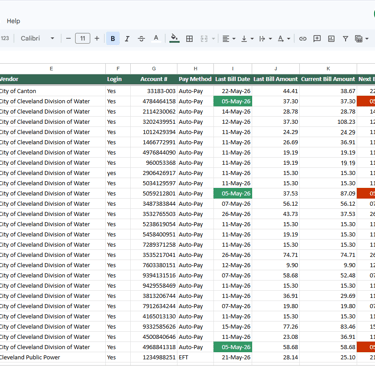
Red — any bill that is due today or overdue
Green — any bill where the last invoice pulled is older than 30 days, signalling that a new bill may be available and needs to be pulled
Nothing slips through the cracks. You open the schedule and the alerts tell you exactly where to focus.
5. Filtered Views
The schedule supports extensive filtering so you can view your AP data from any angle:
Property-wise — see all bills for a specific property
Vendor-wise — see all accounts with a specific vendor
Due date-wise — see everything coming due this week
Bill date-wise — see what was billed in a specific period
This is particularly useful for client reporting — you can filter to a single property and send a clean view to an investor or owner without them seeing the full portfolio.
6. Dedicated Tabs for Non-Utility Payments
Utilities are only part of the AP picture. The schedule includes dedicated tabs for:
Mortgages — payment amounts, due dates, lender accounts, escrow tracking
Property taxes — annual and semi-annual tax bills by property and municipality
Insurance premiums — policy numbers, renewal dates, payment amounts
Office subscriptions — Buildium, AppFolio, QuickBooks, and any other software costs
Every recurring financial obligation in your portfolio lives in one organised system.
7. Tenant Chargebacks
For properties where utility costs are passed through to tenants, the schedule includes a dedicated tab to track:
Which utilities are tenant responsibilities
The billing amounts to be charged back
Whether chargebacks have been invoiced to tenants in your property management software
Outstanding chargeback balances
This makes utility billing and tenant reconciliation significantly cleaner — and eliminates the confusion between owner costs and tenant pass-throughs.
Why Automation Alone Is Not Enough
Many property owners assume that auto-pay solves their AP problem. It helps — but it does not solve it.
Here is why owners relying on auto-pay alone still feel overwhelmed:
They cannot see everything in one place. Auto-pay confirmations arrive in email, bank statements, and portal notifications — across multiple accounts and platforms. There is no consolidated view.
They do not remember which bills are auto-paid and which require action. When you manage 40+ accounts, it is impossible to track this from memory. Manual bills get missed because the owner assumed they were on auto-pay.
They are not tracking invoice saving and recording. Auto-pay handles the cash transaction — it does not save the invoice to your drive or record the expense in Buildium or AppFolio. Those steps still require human action.
Missing invoices create missing expenses. If an invoice is not saved and recorded, the expense either gets missed entirely or is entered incorrectly at month-end — distorting your P&L and creating reconciliation problems.
The AP Schedule becomes the single source of truth that ties the cash transaction, the invoice, and the bookkeeping entry together in one traceable system.
How This Improves Your Accounting Software Entries
Because all bills are organised before they are entered, the downstream impact on your accounting software is significant:
Buildium and AppFolio entries become accurate. Every bill is entered with the correct vendor, amount, billing period, and property allocation. No guesswork, no reconstructed entries.
Reconciliations are straightforward. When your bank statement arrives, every transaction has a corresponding entry in the schedule and in your software. Reconciling takes minutes instead of hours.
Property-level reports are clean. Accurate AP entries mean accurate property P&Ls — which means reliable data for owner reporting, investor distributions, and tax preparation.
Tax prep is painless. At year-end, every vendor payment is documented, every invoice is saved, and every 1099-eligible payment is tracked. Your CPA has everything they need without a scramble.
What Brookeside Accounting Provides
For US rental property owners who want this system built and managed professionally, here is what we offer:
AP Schedule setup — built specifically around your portfolio, vendors, and software stack
Utility and recurring payment tracking — every account monitored, every invoice pulled
Bill downloads and backup — invoices saved to your drive in an organised folder structure
Buildium / AppFolio / QuickBooks bill entry — every payment recorded accurately in your accounting software
Monthly reconciliation — AP schedule reconciled against your bank statements
Tenant chargeback tracking — utility pass-throughs tracked and invoiced correctly
A complete audit trail for tax season — every vendor payment documented and accessible
Signs You Need a Structured AP System Right Now
You have missed a utility payment or paid a late fee in the last 12 months
You are not sure which of your bills are on auto-pay and which require manual action
Your bookkeeper or accountant regularly asks you to reconstruct payment history
You manage more than 5 properties and track bills manually or from memory
Your reconciliations take more than an hour because entries are missing or incorrect
You have had a double payment to a vendor because two people thought the other handled it
If any of these apply, a structured AP system will immediately reduce stress and improve your financial visibility.
Ready to get your AP under control? Book a free consultation with Brookeside Accounting and let us build a system that works for your portfolio.
Brookeside Accounting provides specialised real estate accounting services for rental property owners and managers across the United States, working remotely through Buildium, AppFolio, QuickBooks Online, and Xero.
Contact
Find us on LinkedIn and Facebook
Phone
contact@brookesideaccounting.services
+1 857-208-7210
© 2025. All rights reserved.
QUERIES